Adding nodes to your private blockchain

In my previous post I showed how to create your private blockchain, but a blockchain of one node is not very useful 🙂 Let’s learn how to connect other nodes.

If you followed the steps of the previous post you should already have Node 1 installed. In Node 1 launch geth console and run admin.nodeInfo.enode. You should get something like this:

“enode://639d05c6307c25db77frwkllljssqoe98b2sdasdasdsadasaef07a6a108d133348646b27334cf4ff86a154sadasdsadsdas4d92f322a80e057a9f67e08eeb8f@[::]:30303?discport=0”

This will be the address that you have to give Node 2 so it can connect to Node 1

restart geth on Node 1 setting –maxpeers

geth –mine –networkid 1337 –nodiscover –maxpeers 3 console

Now install geth in Node2 and initialise it using the same genesis block you used to set up Node 1.

geth init genesisBlock.json

In order to connect Node 2 with Node 1 you need to create file static-nodes.json adding the IP and port (which need to be accessible) of Node 1’s machine.

cat > $HOME/.ethereum/static-nodes.json

[
enode://639d05c6307c25db77frwkllljssqoe98b2sdasdasdsadasaef07a6a108d133348646b27334cf4ff86a154sadasdsadsdas4d92f322a80e057a9f67e08eeb8f@192.168.1.10:30303
]

run geth in Node 2, use the same network id as you did in Node 1

geth –networkid 1337 –nodiscover –verbosity 5 console

if everything has worked you will see in Node2 a message showing successful connection

I0829 22:16:38.318582 eth/handler.go:258] Peer 639d05c6307c25db [eth/63]: peer connected [Geth/v1.4.11-stable-fed692f6/linux/go1.6.2]

let’s transfer some ETH from the wallet in Node 1 to the wallet in Node 2. First create a wallet in Node 2 and save the address

> personal.newAccount()
Passphrase:
Repeat passphrase:
0x1329560ae07a9fc8a3161c66dfef13da609cfda5

in our account in Node 1 we can now send money to the newly created wallet in Node 2

>personal.unlockAccount(“0x55a0040fd8ac1177d598e8880cee248c7c9ac1b9″)
>eth.sendTransaction({from:”0x55a0040fd8ac1177d598e8880cee248c7c9ac1b9″, to:”0x1329560ae07a9fc8a3161c66dfef13da609cfda5″, value:web3.toWei(5,”ether”)})

if either Node 1 or Node 2 are mining blocks you will soon see the transaction happening. You can check your new balance at your account in Node 2

>web3.fromWei(eth.getBalance(eth.accounts[0]))
5
Creating a private ethereum blockchain from scratch

Following this webpage  and this one (beware, some steps are deprecated), I’ve been able to create my own ethereum private blockchain. I document it here for those who would like to do the same.

Create a new user, group and home directory, for example privateeth1 and install geth for this user

sudo su
useradd privateeth1
groupadd privateeth
mkdir /home/privateeth1
chown privateeth1:privateeth /home/privateeth1
apt-get install -y build-essential libgmp3-dev golang
sudo su privateeth1
mkdir /home/privateeth1/ethereum
cd /home/privateeth1/ethereum
git clone https://github.com/ethereum/go-ethereum
cd go-ethereum/
make geth

create the genesis block and initialise the blockchain

cd /home/privateeth1/ethereum/
cat > genesisBlock.json
{
“nonce”: “0x0000000000000042”,
“mixhash”: “0x0000000000000000000000000000000000000000000000000000000000000000”,
“difficulty”: “0x4000”,
“alloc”: {},
“coinbase”: “0x0000000000000000000000000000000000000000”,
“timestamp”: “0x00”,
“parentHash”: “0x0000000000000000000000000000000000000000000000000000000000000000”,
“extraData”: “Custom Ethereum Genesis Block”,
“gasLimit”: “0xffffffff”
}
^C
go-ethereum/build/bin/geth init genesisBlock.json

start up geth in a customised port and network Id

go-ethereum/build/bin/geth –networkid 9999

open a new terminal and attach a geth console

go-ethereum/build/bin/geth attach

from within the geth console create an account and write down the address. We will initialise the amount of Ether to this account.

> personal.newAccount()

Edit the genesis block to add your account’s initial balance, afterwards initialise the blockchain again

cd /home/privateeth1/ethereum/
cat > genesisBlock.json
{
“nonce”: “0x0000000000000042”,
“mixhash”: “0x0000000000000000000000000000000000000000000000000000000000000000”,
“difficulty”: “0x4000”,
“alloc”: {

“write here the account address that you received from personal.newAccount(), for example 0x55a0040fd8ac1177d598e8880cee248c7c9ac1b9”:

{ “balance”:”10000000000000000000000″ }

},
“coinbase”: “0x0000000000000000000000000000000000000000”,
“timestamp”: “0x00”,
“parentHash”: “0x0000000000000000000000000000000000000000000000000000000000000000”,
“extraData”: “Custom Ethereum Genesis Block”,
“gasLimit”: “0xffffffff”
}
^C
go-ethereum/build/bin/geth init genesisBlock.json

Now you can run geth again and you will see the balance in your account to have been updated.

go-ethereum/build/bin/geth –networkid 1234 console
> web3.fromWei(eth.getBalance(eth.coinbase),”ether”)

next step is to install geth on another computer and have them communicate. I leave that for the next post 🙂

Encrypting files with GPG

One of the concerns I have in this new world of cryptocurrency wallets is that I’ve never had a file that was worth thousands of Euros! Until now the worst thing that could happen (twice) was that I could lose all my photos…

The immediate solution I imagine to make sure I don’t lose my wallet is to make many copies of it and spread them around all my computers, gdrive and dropbox. But what if some hacker gains access to the file? He could somehow crack my password and gain access to my ETH stash!

The solution I have found so far is to keep several encrypted copies of my wallet. After doing some research I like GPG (the Gnu version of PGP) which is open source and has been around for a long time. This way, if the hacker gained access to this file he would first need to crack the encryption and the Ethereum password having 2 strong layers of complexity.

I’ve installed it so far in my Windows and Mac computers and it’s pretty straight forward.

  1. Windows:
    1. Go to https://www.gpg4win.org/ and download the windows executable (currently Gpg4win 2.3.2)
    2. Once it’s installed you can use the following programs:
      1. kleopatra: with this tool you can create and manage your certificates.
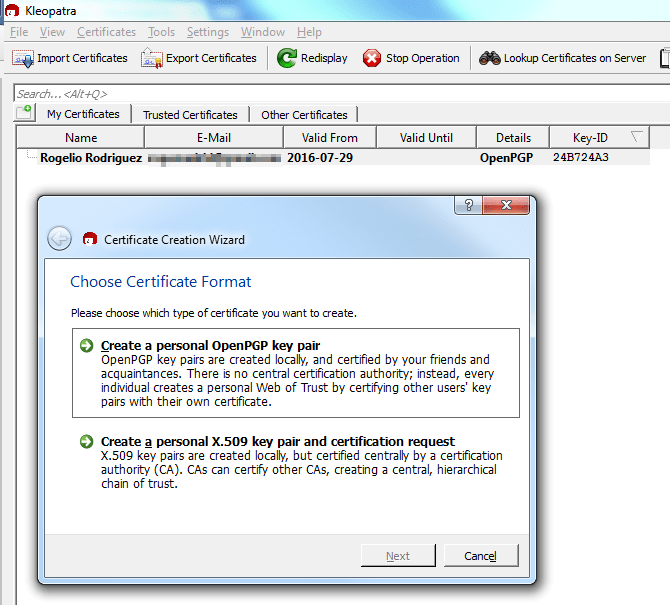
        1. Go to File>New Certificate>Create a personal OpenPGP key pair and follow the instructions. Don’t forget your passphrase! 🙂
          1. kleopatra
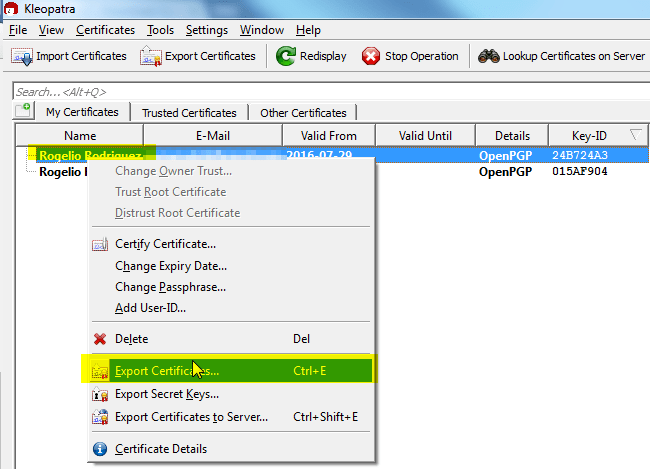
        2. Once you have your private/public key pair generated you may want to share your public key with the world so they can send you encrypted messages which only you can decrypt. You can do this by right clicking on your certificate and selecting “Export Certificates…”
          1. kleopatra1
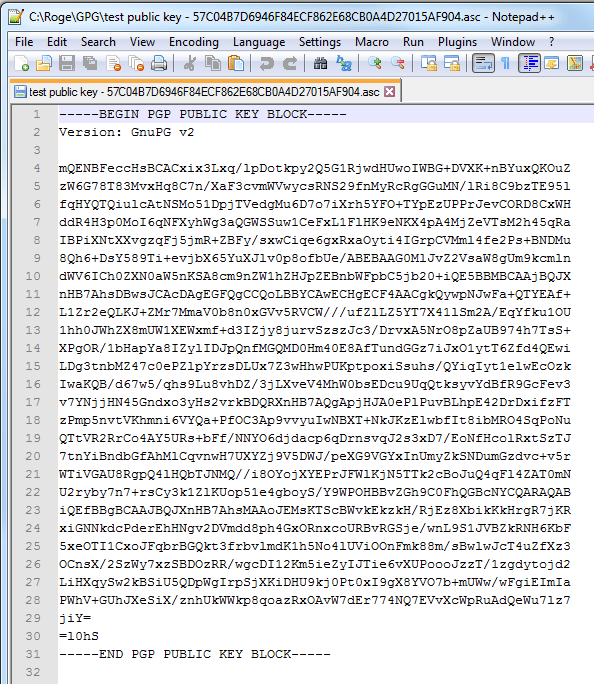
        3. A file will be generated with your public key which looks something like the below picture. Put this in your blog, email signature, billboard… you can share this public key with no risk. People can use it to send you encrypted messages. You can see my public key here
          1. kleopatra2
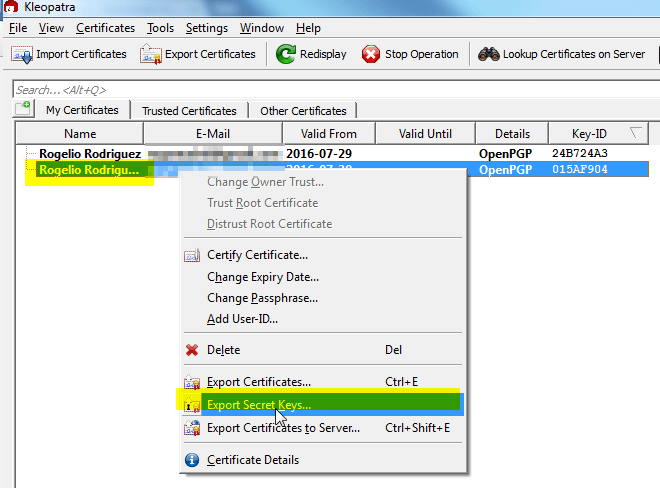
        4. You may also want to export your private key, to copy it to another computer on which you will want to decrypt messages. Take care to ensure your private key is not shared with anyone. To do this right click on your certificate and select “Export Secret Keys…”
          1. kleopatra3
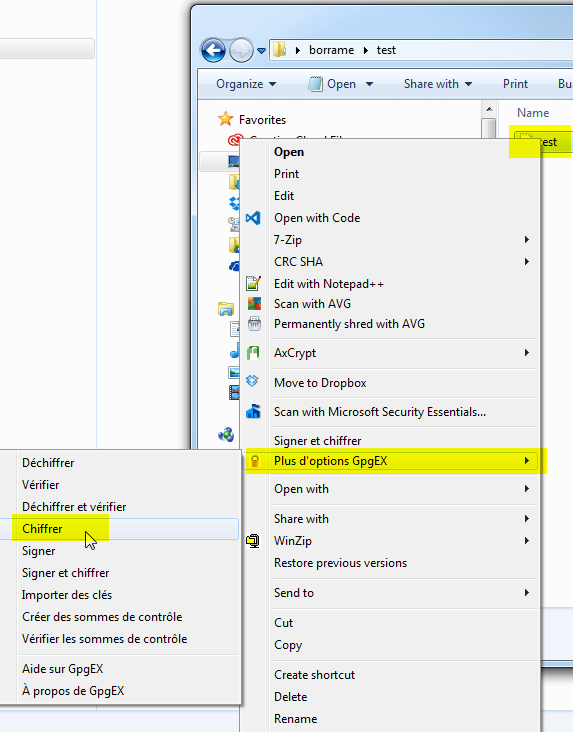
      2. GgpEx: You can access this tool by right clicking on any file and selecting the GpgEx menu. For example to encrypt a file right click on your file (for example your Ethereum wallet) and select under the GpgEx menu>Encrypt
        1. gpgex
      3. You will now see a new file with the extension .gpg This file is encrypted and can only be decrypted by you.
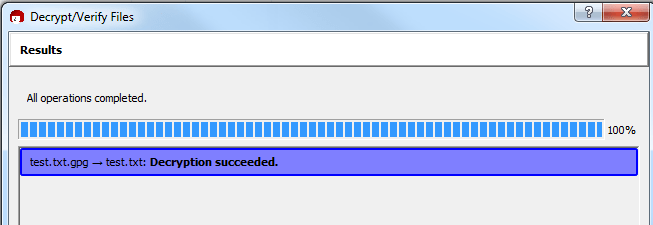
      4. To decrypt it you can right click on it>GpgEx Menu>Decrypt. Insert your password and the file is decrypted.
        1. gpgex1
  2. For Mac the idea is the same, I’m using https://gpgtools.org/
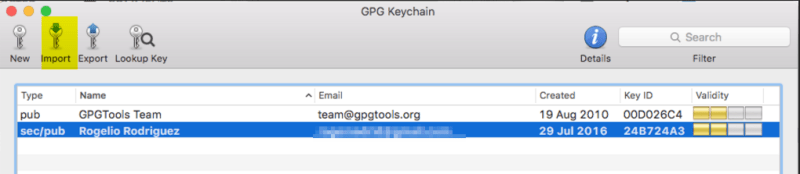
    1. You can create new encryption keys with “GPG Keychain”. You can also copy from a different computer the private keys that you have created (in my case with the windows computer) and import them by clicking on Import.
      1. gpgmac2
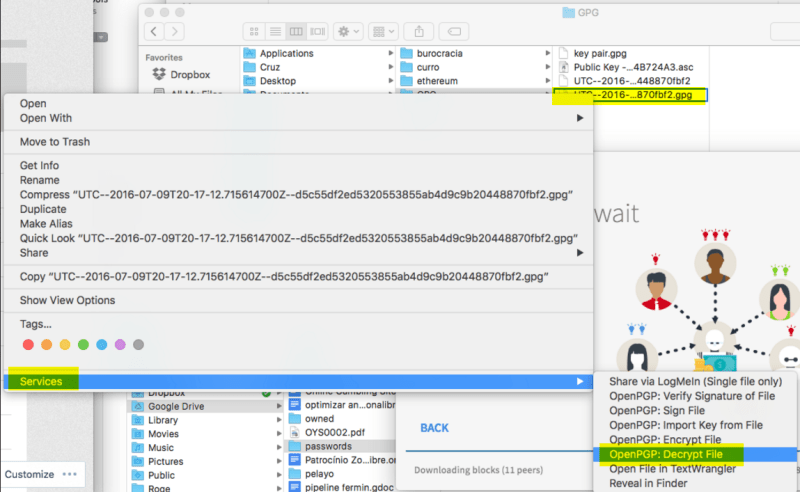
    2. Once the keys are generated (or imported) you can decrypt a file by right clicking on it and selecting “Services>OpenPGP: Decrypt File”
      1. gpgpmac


Thanks to this I can now export my Ethereum wallet. Encrypt it and save a copy in my google drive, which I can download to any computer on which I have my gpg private key in case I need to send some ETH.

Password Management

I’ve taken a leap of faith into the password management world. Until a month ago I used to be the living example of how not to manage your passwords… Kevin Mitnick would not have been proud..

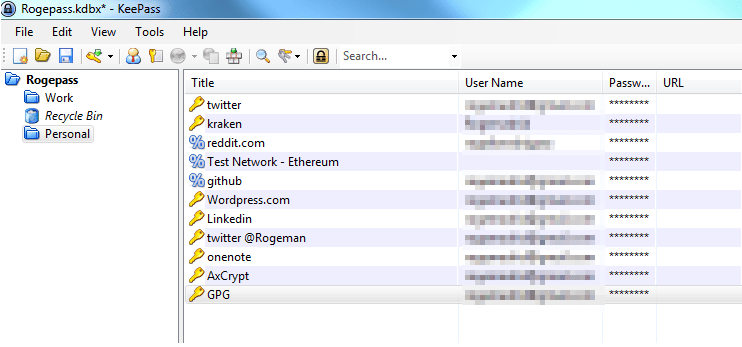
I’ve started using keepass, a free tool which works under windows (and Linux and Mac with mongo) and provides one place where to store all passwords. Keepass uses AES encryption to keep passwords safe. To share my passwords amongst my computers I upload my keepass file to google drive, since it’s encrypted I’m not (too) worried that someone may get all my passwords (ok, I am still a bit worried, but I guess using the same password for every service is a worse alternative, or keeping them written down in my notebook..).

I have as a pending task to investigate lastpass, safe-in-cloud and 1password (are we really sending our passwords to the cloud? one leap of faith at a time for me… ) and find a tool that works securely in ios. (Update: Keepass has Minikeepass for ios, I’ve installed it and it works. It even can get a copy of the passwords file via dropbox)


keepass

My first DAO: Jamon DAO

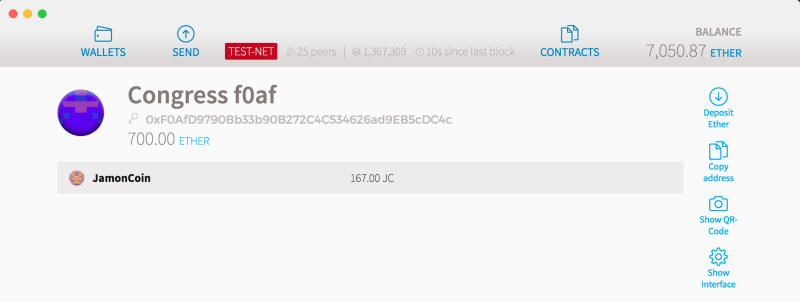
By following this tutorial I’ve understood how to create a “Distributed Autonomous Organisation” (DAO). This particular example is a democratic organisation with 3 voting members (let me know, and I’ll add your hash to become voting member) who manage a smart contract with a balance of JC167 (JamonCoin).

Any member of the DAO can send a proposal, for example: “Send the admin JC100, so he can buy a jamon sandwich” the rest of the members have a fixed amount of time (in my example 5 minutes) to cast their votes. If the voting is successful (in my case it must be by absolute majority), then the proposal can be validated and the funds will be sent.

Jamon DAO


Creativity, knowledge and unapologising nerdism

Like every month of July, my group of friends and I gather for four days at the Euskal Encounter to discuss the evolution of computing. Most of us will not see each other physically until the next year. We have all grown with a shared passion for computers and the unbounded creativity that can be unleashed with them, ready to be shaped by any of us. At the tip of our fingers.

Today, we are senior professionals in diverse areas of computer science: Software development, Security, Systems administration, 3D modelling, Hardware integration, devops, financial systems… each with our separate areas of interest and expertise. In our youth we were amazed by our sinclair spectrum, commodore or amiga computers. We saw the birth of videogames and the 8-bit videoconsoles. We were early adopters of the Internet. We saw the rise and fall of irc chats and the blogging scene, the dominance of Facebook, the appearance of immersive virtual worlds,the arrival of the Iphone and next gen smartphones, the substitution of sms by Whatsapp, the appearance of Skype, Paypal, Airbnb, Blablacar, Wallapop, Uber, Facetime, SpaceX, Tesla…

We have been born in the steep curve of technological advance, where change is faster every day thanks to computers which is our home turf. Where we feel we are just a few lines of code away of being the next Steve Jobs. Where we play with the next toy that falls in the reach of our hand with hopes of transforming it in the next breakthrough that will disrupt the world.

Here’s to us. The nerds. Keep Playing.


By when a cashless world?

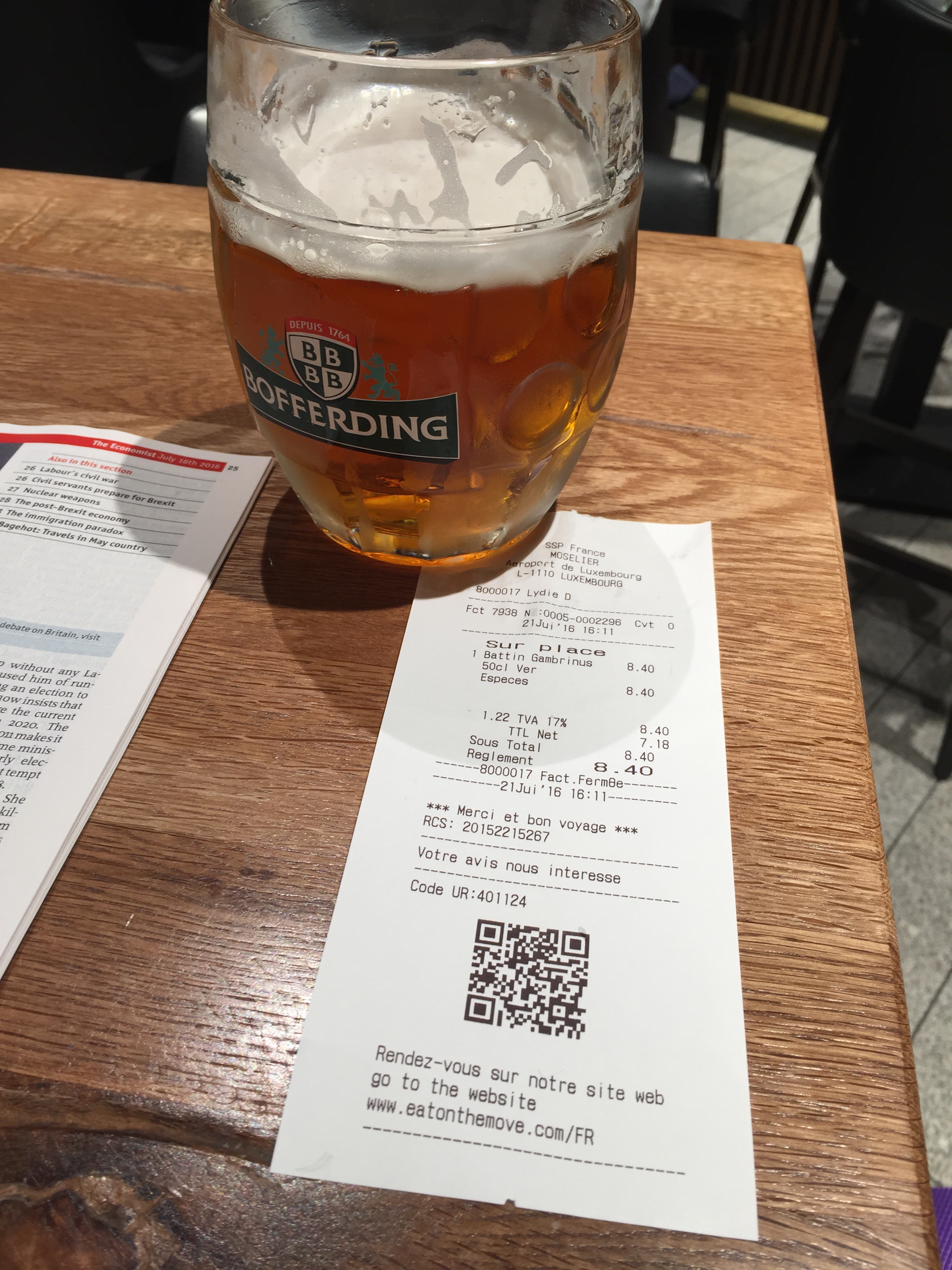
I’m sitting in a bar at the airport, waiting for my plane to board. The lady brings me my beer and when I see the QR code in the ticket, for a second I imagine a time when we’ll be able to scan that code with our iphone and have the payment automagically done 🙂

How does Ripple transfer Fiat currency over the blockchain?

One of the issues I am finding with the blockchain business models is that fiat currencies (Euro, Dollar…) always have to be transformed into cryptocurrencies (Bitcoin, Ethereum…) and then at destination transformed back into the other fiat currency. Since these cryptocurrencies’ value is so volatile this creates fx risk. ( I change 1.000 Euros into Ethereum one day, and the next day I get back 985 Euros)

Ripple is able to transfer fiat currency in real time among banks. How do they do this?

For this they use a different technology than the blockchain. They have created  (and recently open sourced) the “Interledger protocol” which is a 2 way messaging middleware that connects banks point to point or through a third party (Liquidity provider). The trick is they need the connected banks to first deposit funds at the other bank, these funds act as pre-funded collateral which enables the speedy transaction, since the cash is already there from the start. Another cool part of the protocol is that if a direct connection between banks can’t be found, the protocol establishes a multi-hop link going through multiple banks until the link is established. In case no route can be found, there is always a link that can be established via Ripple’s blockchain by transfroming into XRP (this would provide big cost savings) since the transfer is done in almost real time, the fx risk would be very small. A thorough explanation of how ripple works can be found in the Ripple solutions guide

ripple

Here you can see Ripple in action doing an Fx spot transferring 1.000 Canadian dollars to Euro in 8 seconds instead of 4 days.

https://www.youtube.com/watch?v=bAnHzDEP8GM


Creating my own cryptocurrency: JamonCoin

By following this super simple tutorial, I´ve understood the basics of how to create a smart contract, in this case a smart contract which creates a new cryptocurrency. The JamonCoin. Each JamonCoin is backed by assets of Jamon in my fridge, so I expect the value of this cryptocurrency to be recognised by the markets.

You can observe this new Cryptocurrency from your Test-Net Ethereum wallet by clicking on tab “Contracts>Watch token” and pasting the address: 0x8866181a0176480cdD1D5a1d7C58aA73a0f797E3 Let me know if you´d like to receive some JamonCoins to play with.

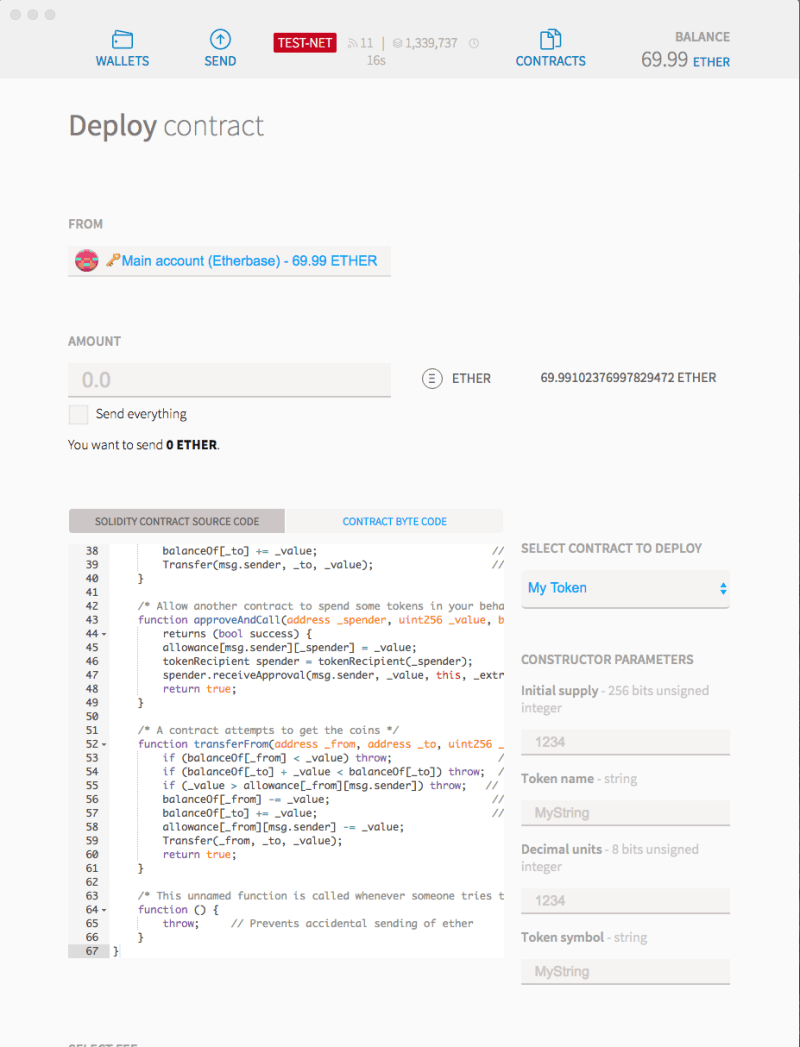
Compiling a new contract is very easy, in your Ethereum wallet, go to “Contracts>Deploy New Contract”, write the code under “Solidity contract Source Code” and you can deploy it by selecting the contract to deploy and initialising it´s values. Solidity is object oriented, so you can use concepts as constructors, classes, inheritance… to deploy it click “Deploy”.

Hello World! 😀

compilerETH


UBS creates Smart Bonds on Ethereum. Is this possible?

In november 2015, Stephan Karpischek, and Ian Cusden from UBS presented a prototype for an Ethereum smart contract that represented a bond issuance.

I’m interested in Bond issuances on the blockchain, as I think it could bring many interesting use cases for small and medium companies to raise money.

However I don’t understand one thing: How can the smart contract guarantee payment of coupons, or principal at maturity? one way would be for the smart contract to block enough cryptocurrency to pay back all the coupons and the principal at the end, but this would render the bond useless. The only possible alternative is that the smart bond can fail to pay back either coupons or principal at maturity. This must be the case, and it changes a big preconception I had about smart contracts, that they guaranteed payment and that this would avoid litigation.

Smart contracts don’t guarantee payment. Now that I think about it, smart contracts don’t even guarantee that they’ll have enough gas to keep running until the maturity of the bond. Smart contracts just automate execution and settlement, which is already pretty cool. 🙂