Automating web actions with selenium IDE

I’ve discovered a new tool which I find quite cool: Selenium IDE.

Selenium is a plugin for firefox which allows to automate actions on a web browser in a similar manner that microsoft excel allows you to record macros and them play them back. This can be very useful if on your day to day you manually repeat the same actions on a web application, for example downloading every day the status reports from the company issue management tool in excel to check the top outstanding issues.

To get selenium up and running just follow these simple steps:

  1. with firefox, open https://addons.mozilla.org/en-US/firefox/addon/favorites-selenium-ide/ and download by clicking on “Add to firefox”, click on Install and restart Firefox.
  2. Open Selenium IDE from your firefox browser by clicking on the top right icon called “Open menu”, click on Developer, and click on “Selenium IDE”, you should see your selenium IDE window pop up.
  3. As the Selenium IDE window opens, it’s ready to record your first test, open a tab in firefox, go to http://www.rogeliorodriguez.net , right click and select “assert Title”
    1. seleniumide1
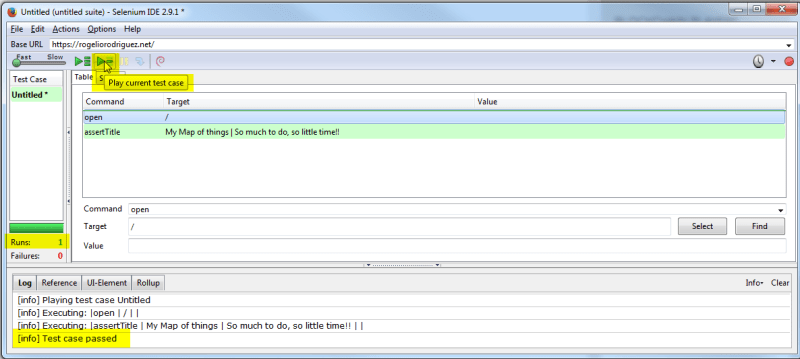
  4. go back to the Selenium IDE window and click on the green Arrow with a dash, you will see that the action has been replayed and that the test has passed successfully.
    1. seleniumide2
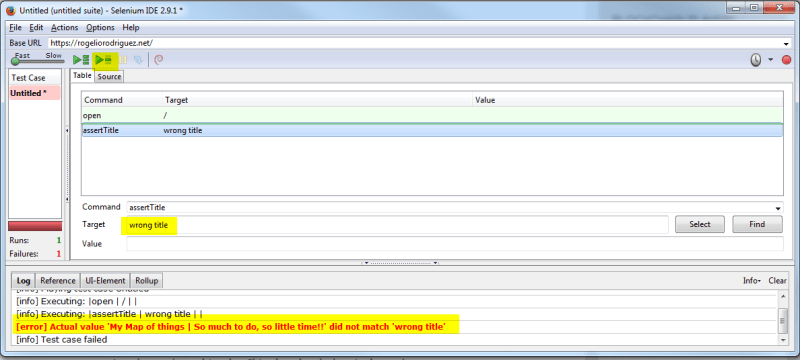
  5. To test that this works we can change the assertion so we can check that with the wrong title the assertion fails
    1. change the assertion to “wrong title” and click on the green arrow with a dash again. you will now see that the test fails, as expected, proving that the assertion works.
    2. seleniumide3
  6. That’s it, you are now set to start using selenium IDE, explore the rest of the commands available with right click. In a future post I will investigate how to integrate this with Java programming so you can perform more complex tests.

Chinese Government intervention in China Bitcoin Markets plummets bitcoin price

It seems Bitcoin isn’t as independent as I thought it was.

Today around 13:00 the price of bitcoin fell sharply after the Chinese central bank announced that they would not allow two of the major Chinese exchanges to permit bitcoin and litecoin withdrawals for a month.

http://www.coindesk.com/bitcoin-price-sinks-1000-chinas-exchanges-cut-withdrawals/

How I read it is:

  1. Bitcoins can be freely exchanged between individuals. Blocking this would be as restrictive as blocking internet access to certain webpages (something that China has already done in the past)
  2. Since it’s hard to block people from exchanging bitcoins, what governments can do is force the hand of the exchanges (Kraken, Poloniex, or in this case Chinese exchanges Huobi and OKCoin) to block withdrawals or exchanges into fiat currency.
  3. Since businesses, salaries and day to day life still happens in fiat currency. By blocking the exchange from cryptocurrency to fiat currency, the value of the cryptocurrency can be put into question. If you can’t turn your cryptocurrency to “money”, you are stuck with something worthless.

This could change in the future if payment in cryptocurrency becomes ubiquitous. Then people would not have to change back into fiat.

This could also change if the central banks issued their own cryptocurrency and guaranteed a 1 to 1 matching between their fiat and their cryptocurrency. This would also reduce the volatility of the cryptocurrencies.

As we speak, kraken.com, one of the major UK Based Exchanges is offline, probably due to the excess traffic from so many people panicking to sell their bitcoins. Also, as a side note, my personal bitcoin portfolio has taken a big hit, I will follow with interest the next days for this rare new world of virtual value 🙂

Software is invisible, and that’s a problem

In the spring of 1987, the town of Alba Iulia, Romania, had a change request to their infrastructure.

They wanted to build a boulevard. The problem was that a 7600 ton building hosting 80 families was on the way. Of course they opted for the sensible solution that anybody would have thought: They split the building in two halves, with the families still living inside, and moved each half of the building 55 meters on each direction. People remained inside at all times, and just to prove a point, a woman decided to place a glass of water on the edge of her balcony. It didn’t spill a drop. The building remained connected to all utilities (water, electricity, etc) during the moving process.

In IT we do invisible things. Google is 2BN lines of code, Reading it at one line per second non-stop would take 63 years. And yet us users don’t see this, for us it’s just a web page which we use. How complex can it be? Surely not that much, after all my cousin’s son who is 15 years old is a whiz-kid programming in Javas.. This invisibility of IT has many unfortunate consequences, architects can learn from each other and appreciate the beauty of the technique in the buildings they create. Quality comparisons can be easily established at plain sight. Barcelona’s Cathedral La Sagrada Familia is obviously different to Kirchberg’s church. How to compare the code from google to the code from windows, to the code that runs my computer’s mouse? We can’t because we don’t see it, sometimes even if we would like to see it we can’t because it’s proprietary software.

Bad design of IT solutions brings misery to the users and elevated maintenance costs to management.

It is unintuitive for an end user to know the complexity of a change that he is requesting in the underlying platform.He could think he’s asking for something “standard/state of the art/our competitors did it” (build a boulevard) without understanding the invisible underlying complexity (move a building)

When a new requirement, or a change in a requirement comes in late, and must be delivered without taking the appropriate time to adapt the design. The solution will not be robust.

Let’s listen to our builders of invisible boulevards.

buildingsplit

Loading arduino programs from headless raspberry pi

A couple years ago, I built with an arduino, a peristaltic pump, an LCD display and an H-Bridge motor controller, a watering machine for the orchid I keep at the office.

arduino

The other day I pressed a button I had put in place to be able to configure the timing for the watering and I must have pressed the sequence wrong (was it push, hold, push, push? or was it push ,push, hold, push…) so now instead of watering for 10 minutes in order to fill the pot and empty it, it just waters for 1 minute. To avoid my orchid from drying up I’ve reverted to the manual workaround of taking it to the kitchen by hand, but this is no way to water a plant…

I could take the whole system home, connect it to my computer and test it out of course, but it would be much cooler to go to the office with a raspberry pi-wifi hotspot, connect to it with my iphone and reload the (simplified) program.

To do it I’ve prepared my raspberry pi the following way:

  1. set up the wifi hotspot
  2. Install arduino
    1. sudo apt-get update
    2. sudo apt-get install arduino
    3. sudo apt-get install python-dev
    4. sudo apt-get install python-setuptools
    5. git clone git://github.com/amperka/ino.git
    6. cd ino
    7. sudo python setup.py install
    8. sudo apt-get install picocom
      1. to exit picocom serial [CTRL + A] followed by [CTRL + X]

  3. Connect the arduino to the raspberry pi via usb
  4. Load the program
    1. mkdir blink && cd blink #we must work on an empty directory
    2. ino init -t blink # initiates a project using “blink” as a template, copy libraries into
    3. ino build # compiles the sketch, creating .hex file (default Arduino uno -m atmega328 for duemilanove)
    4. ino upload # uploads the .hex file

Learning Maven

A colleague at work (hi Clemens! :)) has shown me the wonders of Maven, it’s a really cool tool to standardise the way Java projects are compiled, tested, packaged and distributed and also provides a great way to standardise which libraries and versions are used and downloads them automatically for you.

maven

As everything with my blog, this is more for my future self-reference than to teach anybody anything, as I’m learning it as I go myself. Here’s what I’ve done

  1. Installing Java
    1. sudo apt-get install python-software-properties
    2. sudo add-apt-repository ppa:webupd8team/java
    3. sudo apt-get update
    4. sudo apt-get install oracle-java7-installer
    5. create $JAVA_HOME environment variable
      1. get path to java
        1. sudo update-alternatives –config java
        2. remove the trailing /jre/bin/java, for example if update-alternatives returns:
          /usr/lib/jvm/java-7-oracle/jre/bin/java, then the path for JAVA_HOME is /usr/lib/jvm/java-7-oracle/
      2. add JAVA_HOME=”YOUR_PATH” to /etc/evironment
      3. source /etc/environment to reload the file
      4. java -version should now work
  2. Installing maven:
    1. wget http://www-us.apache.org/dist/maven/maven-3/3.3.9/binaries/apache-maven-3.3.9-bin.tar.gz
    2. tar -zxvf apache-maven-3.3.9-bin.tar.gz
    3. add the apache-maven-3.3.9/bin directory to the PATH environment variable by editing /etc/environment
    4. source /etc/environment to reload the file
    5. mvn -v should now work
  3. Creating a test maven project using an archetype. An archetype is just a template to create the folders structure and the default pom.xls file
    1. mkdir testmaven1
    2. cd testmaven1
    3. mvn archetype:generate -DgroupId=com.mycompany.app -DartifactId=my-app -DarchetypeArtifactId=maven-archetype-quickstart -DinteractiveMode=false
    4. this will create a folders structure and a pom.xml file
  4. Adapting the pom.xml file
    1. The pom.xml defines what maven will do, through the following configurations
    2. These variables define your application
      1. <groupId>com.mycompany.app
        <artifactId>my-app
        <packaging>jar <version>1.0-SNAPSHOT
        <name>my-app
        <url>http://maven.apache.org
    3. To define the modules and versions that will be used, use the block
      1. <dependencies>
        <dependency>
        <groupId>junit
        <artifactId>junit
        <version>3.8.1
        <scope>test
    4. In order to find the details of the dependency you can use mvnrepository.com, for example to figure out the details for the apache POI library you can visit: https://mvnrepository.com/artifact/org.apache.poi/poi/3.15
    5. Maven has a lot of plugins. Plugins are Mojos (Like Pojos, but Maven plain Old Java Object) which can be executed when running different goals.
      1. <build>
        <plugins>
        <plugin>
        <groupId>org.codehaus.mojo</groupId>
        <artifactId>buildnumber-maven-plugin</artifactId>
        <version>1.4</version>
        <executions>
        <execution>
        <phase>validate</phase>
        <goals>
        <goal>create</goal>
        </goals>
        </execution>
        </executions>
        <configuration>
        <doCheck>false</doCheck>
        <doUpdate>false</doUpdate>
        </configuration>
        </plugin>
        </plugins>
        </build>
  5. Executing different steps in the  Build Lifecycle
    1. If you want to compile, test and package your java project for example, it’s as easy as running mvn package.
      1. validate – validate the project is correct and all necessary information is available
      2. compile – compile the source code of the project
      3. test – test the compiled source code using a suitable unit testing framework. These tests should not require the code be packaged or deployed
      4. package – take the compiled code and package it in its distributable format, such as a JAR.
      5. verify – run any checks on results of integration tests to ensure quality criteria are met
      6. install – install the package into the local repository, for use as a dependency in other projects locally
      7. deploy – done in the build environment, copies the final package to the remote repository for sharing with other developers and projects.


Puzzle building and management

My son Pelayo loves building puzzles.

He is almost three, so he’s managing to put together 6 to 12 piece puzzles. Observing him struggle with the frustrations of the problem at hand, I see some parallelisms with my day-to-day as a Financial IT manager:

1. Sometimes he has a piece in his hand that still cannot be put. His narrow view does not allow him to understand that that piece still can’t be put, so he tries to fit it until either he succeeds in hammering it into the wrong place, or by chance he drops it or loses focus on it and takes another piece which can be placed. Things take time. Sometimes it’s not the right time to put a certain piece in place. We can hammer it in place or we can take a step back and drop that piece for later.

2. Sometimes he is trying to put the piece in the right place, but since he has previously hammered the wrong piece into another place, he can’t put the piece where it should go. This confuses him: “But this is surely the cat’s tail! This must go here!”. He does not have the vision to know that there is another piece which is in his way. He tries things until by chance he takes out the wrong piece out of the way. Sometimes there is something blocking in another area which impedes us to progress, until this is fixed, we won’t be able to progress.

3. Since there is only one way all the pieces fit, and the puzzle gives immediate feedback on whether things are going well or not. If he does not lose his patience, he always ends up finishing the puzzle without needing for my help. It’s just a matter of time. Eventually things will be delivered.

My ETH Wallet is empty!

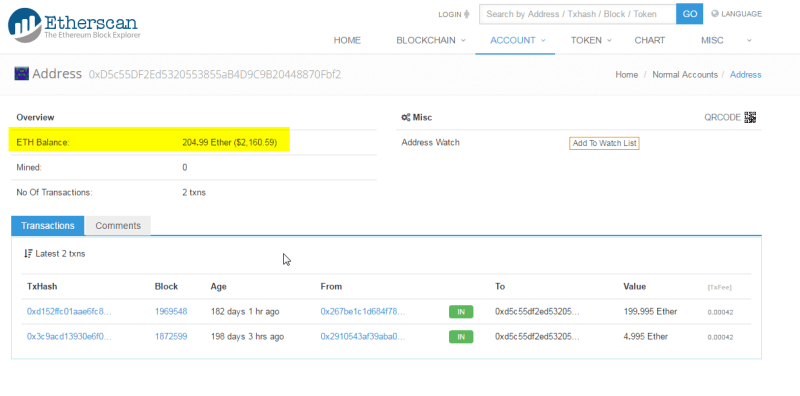
It’s a good thing I don’t have my retirement savings in my ethereum wallet, right now as I write this, my wallet which should show ETH 205 is showing ETH 0!

ethereumempty

Googling around I see there are others which are having the same issue, it seems to have relationship with not having a synchronised blockchain. So I’m synchronising it to see if this fixes the issue.

ethsync

I am not really concerned with having lost the funds, since I can see them in etherscan.io, so let’s see what needs to be done to get them back into my wallet 🙂

etherscanbalance

I wanted to access my ETH to exchange it with XMR (Monero), the promising new cryptocurrency which addresses some privacy concerns which bitcoin has. Since I don’t know when I’ll be able to access my ETH, I’ve decided to use half my Bitcoin (XBT) balance to buy some Monero.

monero


UPDATE: After two hours updating the local copy of the ethereum blockchain, my wallet is now showing the correct balance 🙂

ethereumfull


Monero is on fire

https://www.wired.com/2017/01/monero-drug-dealers-cryptocurrency-choice-fire

This alternative to bitcoin looks exciting.. it corrects the flaw that bitcoin has regarding anonymity.

“If I pay my rent in Bitcoin, it wouldn’t be that hard for the landlord to figure out how much money I earned if I don’t take extra precautions,”

On My to-do for the next month, figure out how to swap half my bitcoins into Monero. 😉

Setting up a git server

In order to progress with my development projects, I needed to use a source control software, the best one for this is Git so I installed a Git server in one of my machines. I ran across some issues which I detail in the below steps list:

  1. Install Git in the server machine
    1. sudo apt-get install git
  2. Add a new user for git in the server.
    1. sudo useradd git
    2. passwd git
  3. Make sure to grant this user ssh access by editing /etc/ssh/sshd_config to add the line AllowUsers git
    1. sudo vi /etc/ssh/sshd_config
    2. sudo service sshd restart
  4. Test that you can ssh into the server with the user git from the client machine
    1. ssh git@server.name
  5. create repository in server
    1. sudo su git
    2. mkdir $HOME/gittestrepository1.git
    3. cd $HOME/gittestrepository1.git
    4. git init –bare
  6. create repository in client and add some files which simulate the code you wish to store in the git repository
    1. mkdir testgitclientrepo1
    2. cd testgitclientrepo1
    3. echo this is code>codefile1.txt
    4. git init
    5. git add .
    6. git commit -m “comitting code” -a
  7. Push the changes to the server
    1. git remote add origin ssh://git@katana.fritz.box/home/git/gittestrepository1.git/
    2.  git push origin master
  8. Anybody who wishes to download the code can do so with the following command
    1. git clone git@katana.fritz.box:/home/git/gittestrepository1.git
  9. After they modify the code, if they want to push it into git, they must identify themselves at least the first time.
    1. git config –global user.email “rogemadrid@gmail.com”
    2. git config –global user.name “Roge Retropie”
    3. git commit -m “modification from retropie” -a
    4. git push origin master
  10. When working in a distributed team, when you want to update your local codebase in the morning with the changes done by your colleagues, run
    1. git pull origin master
  11. If you have done changes to your local code which you wish to discard and overwrite your local copy with the latest server copy
    1. git checkout — .
    2. git pull origin master


git

The golden age of Spanish Software

Between 1983 and 1992, there was a golden age of videogame development in Spain, games developed by teams of 3-4 friends for the sinclair spectrum, msx, amstrad or commodore platforms. I was fortunate to be born in the right time to enjoy these games with my friends, I still remember fresh in my mind titles like “Livingstone Supongo”, “Navy Moves”, “Goody”, “La abadia del crimen” or “La aventura Original”

Thanks to my raspberry pi, I have found them again! 😀 Below the starting screen of “Goody”

goody